
Less swayed by price and package size
A cheaper-looking product can become more expensive once quantity is included. Cheaper Choice helps you compare beyond the visible price by calculating with quantity included.
Have you ever wondered which product is actually cheaper when sizes and prices are different? Cheaper Choice is a price comparison app that lets you check unit price, lowest price, average, and median simply by entering price and quantity.
Enter price and quantity to check unit price, lowest price, average, and median. Instead of relying only on visible prices or bigger packages, you can judge the deal with clearer context.
I once saw three products with different sizes on the shelf. When I calculated the unit price, the middle option was actually the most expensive. After that, I started choosing the largest size because it felt safer.
But another day, the middle option turned out to be the cheapest. Big text, loud colors, strong sale messages, and package size can all make a price look better than it is. That frustration is why Cheaper Choice was made.
When it becomes easier to spot better deals, it also becomes easier to keep a little more money over time. That extra room may help you choose more time, knowledge, or experiences for yourself. That is why the core comparison features in Cheaper Choice are free to use.
To keep the app available for free, ads are shown. When needed, you can temporarily turn ads off by watching a rewarded ad.
Cheaper Choice helps you avoid choosing only by what looks cheap or what looks like a better size. Compare unit prices and price context so you can choose with more confidence.
A cheaper-looking product can become more expensive once quantity is included. Cheaper Choice helps you compare beyond the visible price by calculating with quantity included.
Check the lowest price, average, and median together so you can quickly understand whether a price is low, high, or close to the typical range.
At first, enter only store, product, quantity, and price. From the next time on, saved stores and products can be reused, making repeated shopping comparisons easier.
Tune the visual style, colors, and display options so the comparison screen feels easier to read and more comfortable to use over time.
The actual app screen shows detailed comparisons. Here, the flow is simplified to show how input can become easier from the first entry to later saved entries.
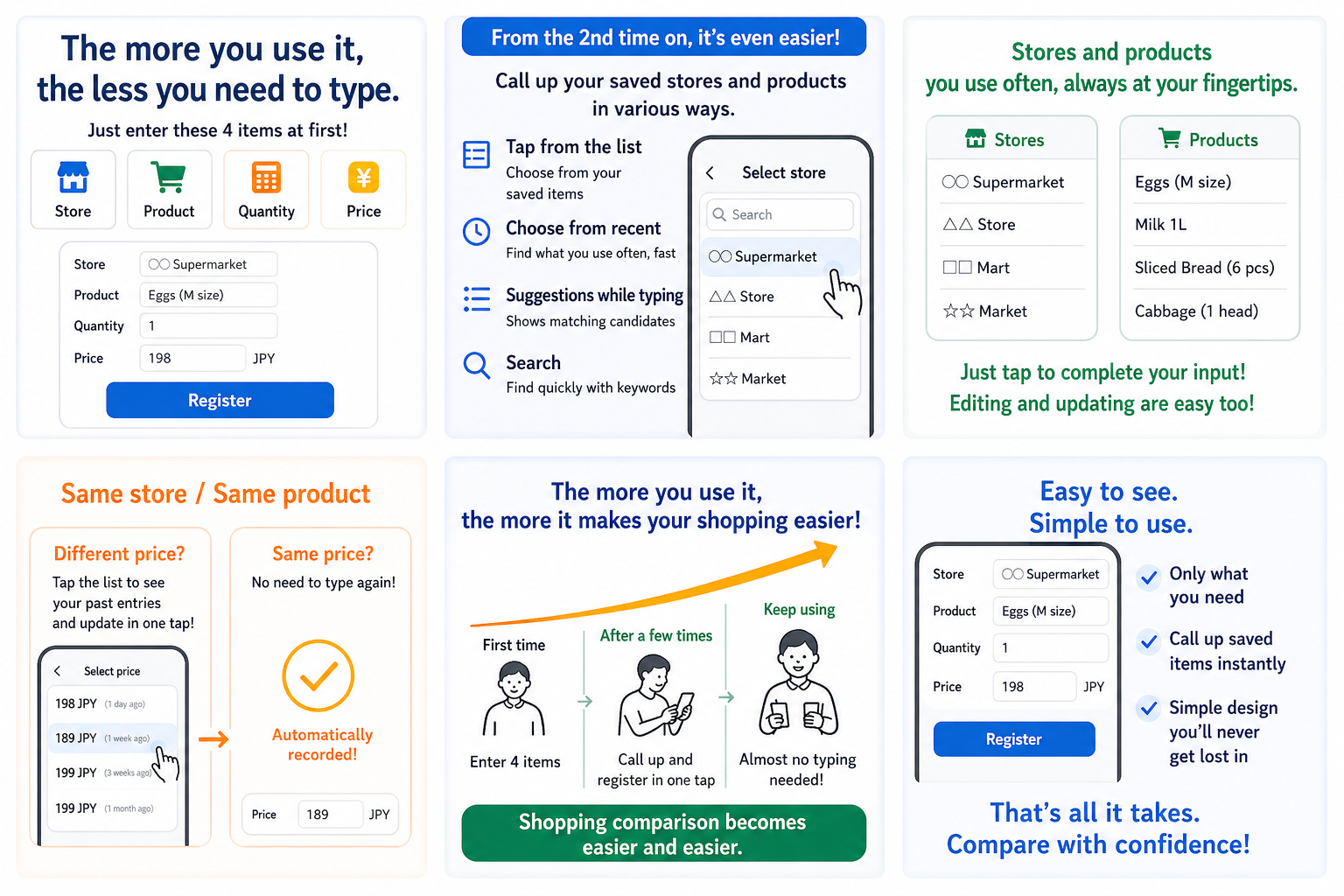
Register a store, product, quantity, and price. Saving the first entry makes it easier to reuse as a candidate next time.
If the same store and product have a different price, call up the saved entry and update the price. If the price is the same, you may not need to type anything again.
Enter a little at first, then let repeated comparisons become easier over time.
*This is a simplified explanation of the input flow. The actual app screen may differ in some details.
Cheaper Choice is built not only for comparison, but also to explain usability, ads, and data handling as clearly and honestly as possible.
Unit price comparison, lowest price, average, median, and other core features for spotting better deals can be used without an additional charge.
Ads are shown so the app can keep offering its core features for free. When needed, you can turn off ads for a limited time by watching a rewarded ad.
Cheaper Choice does not use its own server to send registered store names or product names. Except for communication used to display ads, comparison data is managed on your device or in files you choose to save.
Keep your registered items, load them later, and continue using a familiar comparison setup. Saved files are under your control, but if you share or publish them, their contents may be visible to others.
Demo data helps you understand the app at first. If you do not need it, you can clear it and start fresh after saving a backup if you want.
Cheaper Choice helps with price comparison, but it does not guarantee the final purchasing decision. Store conditions, product details, and discount rules can vary, so please confirm displayed prices, quantities, and discount conditions before you decide.
See the features that support everyday comparison, including display customization, save and load, discounts, and multi-quantity input.
Switch visual styles and display options to make the comparison screen easier to read and more comfortable to keep using.
Save registered items and load them later so you can review past entries and keep using a familiar setup.
Reflect real sale conditions such as percent-off and fixed-amount discounts to understand the actual value more easily.
Compare products that involve multiple quantity factors, and check the help when you need guidance so it is easier to get started.
Cheaper Choice is useful when a cheaper-looking item does not feel trustworthy, or when a bigger package does not always seem like the safer choice.
Enter price and quantity to check unit price, lowest price, average, and median. Ads are shown, but the core comparison features are free. Compare calmly and use the money you save for your time, knowledge, and experiences.